Wednesday, July 12, 2023

No Download Button? How to Download Audible to MP3 in 2023

 Do you want to download your purchased Audible books, but there is no download button?
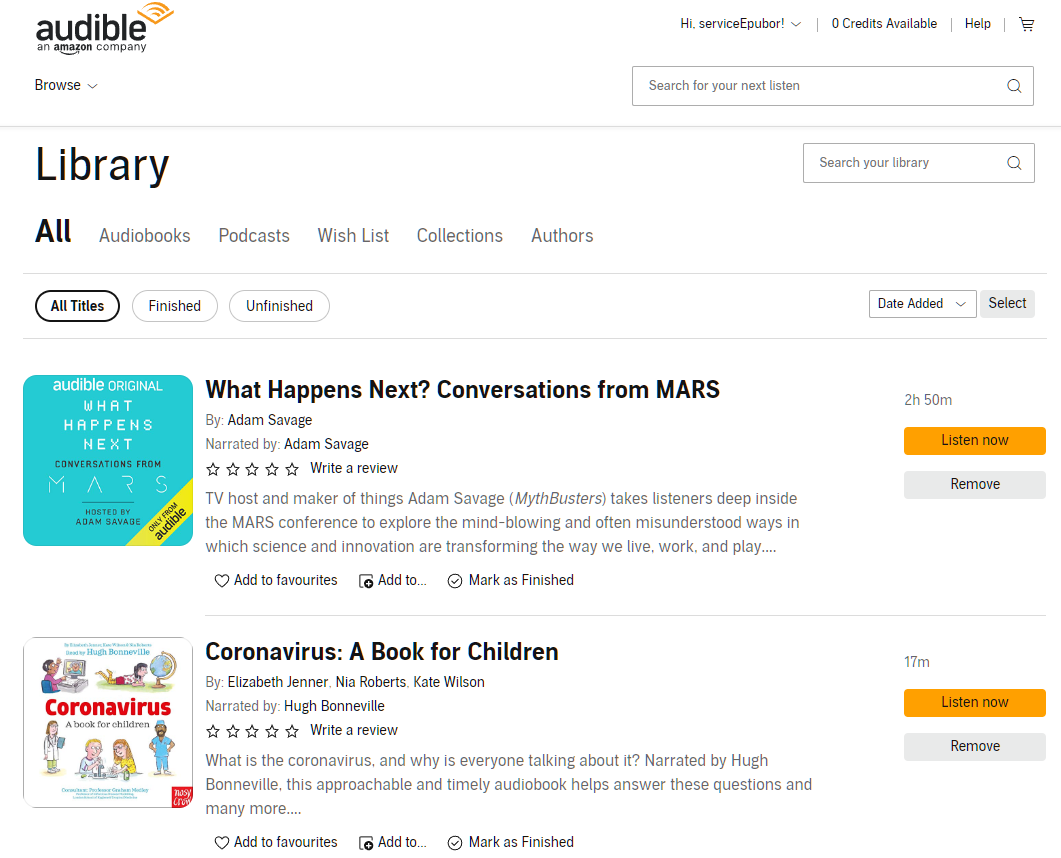


Audible has cancelled the "Download" button in many Audible marketplaces, such as Audible.de, audible.co.uk, audible.au and more.

Without the download button, you cannot download Audible books to your computer anymore. This means you will have to stick to Audible-related apps. It is annoying, right?

If you encounter this issue, please don't worry. The newly published Epubor Audible Converter can make this much easier. With the significant update, Epubor Audible Converter allows you to download your Audible audiobooks to mp3 on your computer when there is only a "Listen Now" button. A big step, right?


Keep reading to learn how it works.

Step 1: Download and install the latest version of Epubor Audible Converter.

Step 2: Login to Audible in Epubor Audible Converter.

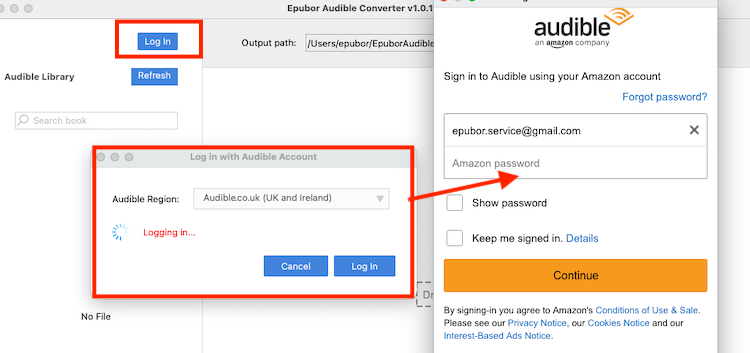
After launching Epubor Audible Converter, click "Log in" and select the correct Audible region.


Then sign in with your Audible/Amazon account.


Step 3: Add Audible books.

Once logged in successfully, your Audible audiobook titles will be displayed on the left side under "Audible library". 
You can just drag them to the right side to add them to Audible converter.

Step 4: Download and convert Audible to MP3 at the same time.

Now you can just click "Convert to MP3" to download audible books to mp3. But if you need to split your audible into chapters, please check the box next to "Split by chapters" before clicking "Convert to MP3".

Give it a few minutes. The Audible books will be downloaded as drm-free mp3 files. You can just click "Open" at the top area to prompt the folder storing your downloaded and converted audible files.


It is the best Audible Downloader and Converter on the market. Why not just download and try it now?

Tuesday, June 13, 2023

How to Help Students Save Money on College Textbooks?

The global economy is gloomy. And education costs continue to rise, leading many students to employ various strategies, such as loans, photocopies, and decrypt textbooks for good, to afford the necessary resources. According to a Danish survey, approximately half of the students who utilize digital textbooks confess to having used pirated copies at least once.

Despite lawsuits discouraging piracy, students continue to source free pirated books from various channels. As TorrentFreak reported, textbook piracy is a prevalent phenomenon worldwide. 

On the one hand, the cost of a textbook is very expensive. On the other hand, student loan is also a huge burden for many college students. Therefore, we think it is reasonable to back up your purchased textbooks or download a free copy from the Internet for personal use. That’s why Z-Library is so popular among college students, which provides access to a vast collection of free and downloadable resources, including e-books, articles, and other digital materials. 

There are two famous textbook online distributors: Kortext and VitalSource. Kortext.com is very popular in European countries. While the VitalSource platform occupies the eTextbooks market mainly in the US. 

People are not born equal. We think it is a good idea to decrypt your legally-purchased textbooks and share them with classmates in need, especially those who have financial problems like most college students who have to pay large sums of loans after graduation. 

Thanks to the Internet, there are many powerful tools that are designed to back up Kortext and VitalSource books for personal use.

If you need to remove DRM protection from Kortext books, you can follow this step-by-step guide to back them up to your computer for safekeeping. 

You can also use another tool to decrypt your VitalSource books for personal use. 


Thursday, May 18, 2023

Introduce Epubor Kindle Converter

Since 2023, Amazon has made some changes to how books can be downloaded:

1. The latest Kindle App is required to download Kindle books published in 2023. 

2. If you have a Kindle device, all your purchased Kindle books can also be downloaded into a breakable format via Download & Transfer via USB from the Amazon content page. 

These changes affect the removal of DRM from Kindle books published in 2023. All Kindle books downloaded via the latest Kindle for PC/Mac can not be decrypted. If you do not have a Kindle device, either, Epubor now provides you with a new DRM Removal – Epubor Kindle Converter, to help you decrypt Kindle books downloaded via the Kindle Android app in the emulator. Below is a brief guide:

First, you need to download and install an easy-to-use Android emulator on your computer.

Second, set up the emulator for it to work. 

Third, install Kindle for Android app in the Android Emulator. 

Forth, download Kindle books via the Kindle Android app in the emulator. 

Fifth, download Epubor Kindle Converter on your computer.

Sixth, remove Kindle DRM and convert them to your preferred formats. 

For more detailed steps, please follow this full guide to back up your purchased Kindle books, including those published in 2023. 

Thursday, May 11, 2023

How to Download Kortext Books to PDF/EPUB

Recently, the Epubor team released Epubor Kortext Downloader to enable users to download their Kortext books into DRM-free EPUB/PDF files. 

Kortext is the UK’s NO.1 learning platform and supplier of digital textbooks by collaborating with over 85% of the prestigious UK universities. With access to over 2 million digital books from 4,700 publishers and a vast array of study tools, Kortext can help students get through university life much easier. However, there are many limitations to Kortext books, such as sharing or printing content for personal use. How can we get rid of these limitations? Epubor Kortext Downloader can help you out. 

Step 1. Download Epubor Kortext Downloader on Your Computer
Step 2. Sign in to your Kortext Bookshelf

After installing Epubor Kortext Downloader on your computer, launch the software. If you are a trial user, you can skip the registration step to sign in to your Kortext bookshelf directly. But the trial version can only allow you to download 3 Kortext books for free. 

Step 3. Get Kortext Library. 

After you've signed in to Kortext Downloader, click Get Kortext Library button on the top of the Window to start syncing all your Kortext books to Epubor Kortext Downloader. 


When all your Kortext books have been uploaded to Epubor Kortext Downloader, the window for the Kortext site will close immediately. 

Step 4. Download Kortext Books to PDF/EPUB.

All your Kortext books will be displayed on the left sidebar, then select the books and drag&drop them to the right window, next, click the Download button to start downloading your Kortext books to EPUB or PDF files depending on their original formats provided by Kortext.com. 

Epubor Kortext Downloader is a useful tool to back up your Kortext books in EPUB or PDF format onto your local computer for safekeeping. Being able to read your Kortext books on any device is very useful. Now you can study anywhere, anytime.

Thursday, May 4, 2023

Kindle Fire Tablet can Assist You in Removing Kindle DRM!

Since Jan 3rd, 2023, there’s been no DRM Removal tool on the ebook market that can handle the new Kindle DRM. However, with the help of a Kindle device, you can still be able to get rid of the DRM protection from all your purchased content. Before, you can only use a Kindle eink device to decrypt Kindle books downloaded via USB from the Amazon website. But now you can also use the Kindle Fire tablet to remove Kindle DRM as well. The following guide will walk you through the whole process to remove Kindle DRM using the Kindle Device.

Step 1. Download and Install DRM Removal on your computer

Epubor Ultimate is a powerful DRM Removal that is designed for getting rid of DRM from mainstream ebook vendors, including Amazon. 

Step 2. Download Kindle Books vis USB from the Amazon Website

Right now the only solution to get rid of DRM from the new Kindle books is to download your books via USB. Visit the Amazon website > Click Content & Devices in the drop-down menu > Click Books > Select all the books you need to download > Choose Download & transfer via USB in the More actions menu. Then all the Kindle books will be downloaded in .azw3 format.

BTW, Amazon removed the Download via USB option from Kindle Unlimited books. And Kindle Unlimited books are not supported by DRM Removal tools.

Step 3. Plug in Your Kindle Device

Since Kindle Fire Tablets can be used to remove the new Kindle DRM, Epubor Ultimate adds this new feature to support Kindle Fire tablets, too. It is really cool that Epubor Ultimate can auto-detect the serial number of your device just by plugging it into your computer. 

Step 4. Remove Kindle DRM

After Epubor Ultimate obtains the serial number, you can add the previously downloaded azw3 files to Epubor Ultimate. As you can see, removing DRM from all purchased Kindle books has never been so easier before. 

Now you can back up your Kindle books, share them with friends, access them offline, or read them on any device you prefer. Congrats, finally, you take back full control of your owned books. 

Tuesday, April 11, 2023

Kobo Revealed Their Brand New Kobo Elipsa 2E eReader

The first-generation Kobo Elipsa was released in 2021. Now Kobo has officially revealed the upcoming second-generation Kobo Elipsa, called the Kobo Elipsa 2E. Here’s a video that showcases its main functions. 

The Kobo Elipsa series is a versatile e-reader that is capable of a wide range of features and functions. The Kobo Elipsa 2E features a10.3-inch E INK Carta 1200 e-paper display with a resolution of 227 PPI. Most of the specs remain the same as before, but now it uses a different CPU -- 2GHz instead of 1.8GHz. Here are some of the updated capabilities of the Kobo Elipsa 2E:

  1. The new Kobo Elipsa 2E comes with a new updated Kobo Stylus 2, which is designed to help you focus and organize your thoughts.
  2. With Kobo Elipsa 2E’s improved note-taking experience, you can write directly on eBooks and PDFs and export notes with integrated cloud services. 
  3. Kobo Elipsa 2E offers the latest glare-free E Ink screen and comfortLight PRO. 
  4. Kobo Elipsa 2E has 32GB of storage, so you’ll always have room for your eBooks, Kobo Audiobooks, and notebooks.

Overall, the Kobo Elipsa 2E is a highly capable device that offers a range of features for both reading and note-taking. Whether you're looking for a simple e-reader or a versatile tool for reading and note-taking, the Kobo Elipsa 2E has something to offer.

Tips: if you want to back up Kobo books, you can use Epubor Ultimate to remove DRM from your purchased ebooks.

Thursday, April 6, 2023

Kobo Plus is now available in the US and UK!

Kobo Plus subscriptions are now available in the US and the UK. It was already available in France, Canada, Australia, Netherlands, Belgium, Italy, and New Zealand. 

Bart Robers, Kobo's director of audiobooks and global subscriptions, said in a press release on Wednesday: "At Kobo, we're always working to make the reading experience better and more accessible, and there's nothing as gratifying as saying 'read as much as you want for a set monthly fee,' which is exactly what our Kobo Plus subscription offers."

Kobo offers 1.3 million ebooks and 100,000 audiobooks for Kobo Plus subscribers. And Kobo Plus service has three subscription plans: 

  1. Kobo Plus Read - Allows you to access over 1.3 million eBooks. 
  2. Kobo Plus Listen - Allows you to access over 100,000 audiobooks. 
  3. Kobo Plus Read and Listen - Allows you to access over 1.3 million eBooks and 100,000 audiobooks.

Kobo Plus Read and Kobo Plus Listen cost $7.99 a month, and Kobo Plus Read and Listen costs $9.99 a month.  And all the content can be read or listened to on any Kobo eReader or with the Kobo app. 

Now Kobo Plus can be a strong competitor against Amazon Unlimited subscription, which costs $9.99 a month and offers more than 3 million eBooks.

Notice, both Kobo Plus and Kindle Unlimited books are not owned by you since they are just rental services. 

Bonus tips: If you need to back up your purchased Kindle and Kobo books, you can follow this step-by-step guide to remove DRM