Friday, November 2, 2018

Get $10 off your first eBook or audiobook at Walmart

Since the day Walmart declared to cooperate with Kobo to sell Kobo books and reader, it has already drawn great attention from the publics. Now Walmart thrills us one more time with the big offer to get $10 off your first eBook or audiobook at Walmart, including new releases and bestsellers.

All it requires is creating a free account with Walmart eBooks. If you already have a Kobo account, you can still take advantage of this $10 off deal. After using the $10 discount, you can link your Walmart and Kobo accounts together to add that book to your Kobo library.


Offer valid only for legal residents of the United States who make their first purchase on kobo.com before December 31, 2018 at 11:59PM EST. A $10.00 credit will be automatically applied against your purchase of an item priced at $10.01 or more (excluding tax). Credit may only be used once, and is valid for first time purchasers only. If you have made a purchase using your Walmart eBooks account in the past, you will not be eligible for this offer. This offer is not valid in conjunction with any other offer or promotion and cannot be used to adjust amount paid on previous purchases. Discounts cannot be applied nor the discount value refunded once a purchase is complete. Rakuten Kobo Inc. reserves the right to change or cancel the offer at any time without notice.

Thursday, October 18, 2018

The 5.10.1.1 firmware update is available for Kindle eReaders

Not long after Amazon releases its all-new Kindle Paperwhite 4, it also reveals the latest firmware update today. This update should automatically download and install to your Kindle when connected wirelessly; however, you can also manually download the software and transfer the update to your device via USB cable.

Here’s what’s new for the 5.10.1.1 update:
·         Swipe-able Home: Swipe up on your home screen to see additional tips, recommendations, and more based on your reading habits.
·         Easily personalize your reading: Now save multiple reading settings, selecting the font, boldness level, and orientation settings you prefer all from the main menu and quickly switch between those settings.
·         Return borrowed books: You can return Kindle Owners’ Lending Library books from within your library by long pressing on a borrowed book and selecting return.
·         Battery percentage: The percent of battery remaining is shown.
·         Labels for the standard toolbar: Labels are added under each icon on the standard toolbar for improved navigation.
·         Performance improvements and other general enhancements.


Here’s how to manually download and install a software update.
Before manually downloading the software update, determine the current software version on your Kindle.
To determine the current software version on your Kindle: 
1.     From Home, tap the Menu icon, and then tap Settings.
2.     From Settings, tap the Menu icon again, and then tap Device Info.
If you have the latest update, it should look like this: Kindle 5.10.1.1
If you do not have this software version, click the link below to download the software update to your computer: Software Update 5.10.1.1
After you've downloaded the file to your computer, see Transfer & Install a Kindle E-Reader Software Update for instructions on installing the update.
Download Epubor Ultimate for Free

Wednesday, October 17, 2018

The all-new Kindle Paperwhite is now waterproof


Today Amazon releases the all-new Kindle Paperwhite. This new Kindle Paperwhite adds some important features:thinner, lighter, with Audible integration -- and now waterproof! And it’s available for pre-order for $129.99 for the 8 GB model and $159.99 for the 32 GB model. 

The all-new Kindle Paperwhite is the thinnest, lightest Kindle Paperwhite yet, with a 6 inch E Ink Carta HD capacitive touchscreen so you can read comfortably for hours. It concludes 300 ppi, glare-free Paperwhite display, laser-quality text, and twice the storage of the previous generation. Plus a single battery charge lasts weeks, not hours.

Kindle Paperwhite 4 has a front-lit display with five LED lights, whereas the Kindle Paperwhite 3 only had four LED lights.

With the all-new waterproof Kindle Paperwhite, you’re free to read and relax in more places. It can protect against accidental immersion in up to two meters of fresh water for up to 60 minutes.

Most importantly, the all-new waterproof Kindle Paperwhite supports Audible books. Now with Audible, Kindle Paperwhite lets you switch seamlessly between reading and listening via Bluetooth-enabled speakers or headphones. 

Are you excited about these new functions?

Friday, October 12, 2018

Google Translate can now visually translate more than 50 languages


According to the latest news, the Google Translate app will be capable of visually translating 13 new languages by using the camera on your smartphone.

In 2015, Google added the visual translation feature to the Translate app with the support of 27 different languages. It allows users to translate dinner menus and signs in real time, making communicating abroad much easier. This week’s announcement puts the total number of supported languages close to 50.

Users can access the feature in the Translate app by navigating to the camera icon on the home screen. The app will then prompt you to line up the text you’re attempting to translate and take a photo. After that, the app will scan the text with the use of Neural Machine Translation, which will then provide a translation into the language of your choice. But the translation is not 100% correct.

With Google Translate app, you will never be afraid of communicating with foreigners or ordering food in a foreign restaurant.


Monday, October 8, 2018

Apple iconic co-founder Steve Jobs' 7th death anniversary

The visionary former Apple CEO died on October 5, 2011 at the age of 56 due to pancreatic cancer. Jobs is credited for making Apple one of the biggest and most-loved technology brands in the world. It was his love for product design and perfection that disrupted and transformed several product segments across categories -- mobiles, music, PCs, apps and more...
On the seventh death anniversary of Jobs, Apple CEO Tim Cook remembered him by tweeting, "Steve showed me—and all of us—what it means to serve humanity. We miss him, today and every day, and we’ll never forget the example he set for us."

Let’s take a look how Steve Jobs changed smartphone, app and 4 other technology segments.


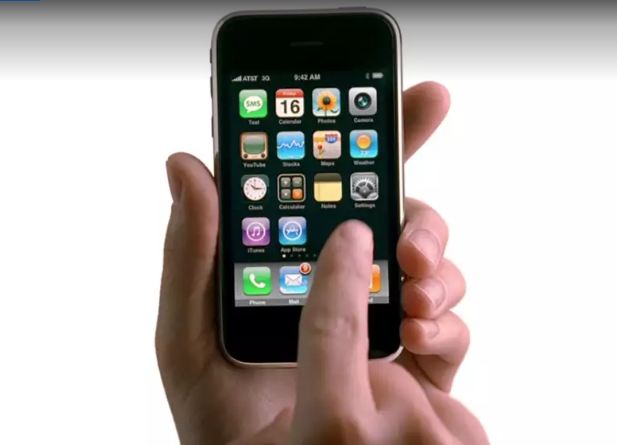
Steve Jobs changed the smartphone industry forever with the launch of the first-ever iPhone in January 2007. The first-ever Apple smartphone hit the retail shelves in the US in June the same year. The touch-screen smartphone supported GSM connectivity along with GPRS and EDGE for data transfer. Since then, iPhones have continued to be the given several.


Apple’s Macintosh 128K was the first-ever desktop computing machine from the company. It was launched with the moniker – Apple Macintosh in 1984. Macintosh 128K sported a 9-inch CRT monitor and came along with a couple of accessories including a keyboard and a mouse. There was a handle at the top that made it easy to carry it around. But then the firm later already had a ‘laptop’ line up under the ‘PowerBook’ series.


iPod (M8541) was Apple's first-ever portable media player. Unveiled in October 2001, iPods were launched with the tagline ‘1000 songs in your pocket’. The first iPod had a monochrome LCD display with 5GB storage. What made it stand out was its compact form factor that was made possible with a 1.8-inch hard drive. The competitors used the 2.5-inch hard drive at that time.


Apple’s MacBook Pro is today considered one of the most powerful laptops. The MacBook Pro line-up too took its baby steps during the Jobs' era. In 2006, Jobs introduced the first-ever 15-inch MacBook Pro laptop. It was built on the previous PowerBook G4 laptop and was also the first to run on dual-core Intel processor.


App developers need to thank Steve Jobs for giving the world first App Store. Apple App Store made debut in the year 2008 with just 500 apps. Today, the App Store offers iOS users over 2 million apps. Not just this, App Store got Apple over $22 billion revenue in the first half of the year.


Steve Jobs launched the first iPad in January 2010. The first-generation Apple iPad marked the debut of the tablet industry in the right sense. Microsoft too had experimented with a similar form factor device in the year 2000, but it failed to find too many takers. The device also had a major impact on the tablet industry that barely existed in 2010. The first iPad was powered by Apple A4 processor and had a 9.7-inch touchscreen display.


Thursday, September 27, 2018

How to download Audible books on Windows computer?

Did you know?
You can download all of the audiobooks you've purchased on Audible.com from the Library screen on your Audible for Windows 10 desktop app:
1. Open the Audible app on your computer
2. Tap Library from the left navigation menu
3. Locate the title you would like to download and tap the cover art to begin downloading. 

However, from now on, you can’t download purchased Audible books to your computer on Audible.com by simply clicking the Download button like we used to. Then click the .adh file to start downloading the Audible book via Audible Download Manager. But now when you go to my library and click the black download button, it just links you to a part of the site listing all the different audible apps available for every platform, instead of prompting a download. You may feel annoyed by this. So next I am going to show you how to download Audible Books on Windows computer using Audible Download Manager?


If you using a Windows 7, 8 or even 10 OS, first of all, please contact Audible Customer Support to ask them to "updated my download settings" because you can’t download Audible books via Audible Download Manager, next please install the latest Audible Download Manager to your computer. Then go to Audible.com>>My Library and click the download button. Audible Download Manager will open automatically and display the download progress of the audiobook. After downloading your audiobook, it will be playable in the player you chose to import the file to.

So in a word, you can download Audible books to your computer via Audible Desktop app directly if you are using Windows 10 OS or via Audible Download Manager after asking Audible support to "updated my download settings". 
Download Epubor Audible Converter for Free

Tuesday, September 18, 2018

The Most Popular Kindle Skin 2018

Skins are the lightest, easiest, most colorful way to protect and personalize all your devices. How to choose a tailor-made Kindle Skin for your Kindle devices? And how to Turn your kindle into a good-looking objects to make you feel good? Here are some Kindle skin options for the Kindle Fire, Kindle Oasis, Paperwhite, and other models.

I have searched a lot of Kindle skin manufacturers and I came across the best skin providers with the most fabulous artwork—DecalGirl. Since 2003, DecalGirl has been manufacturing full-color, removable vinyl skins for laptops, cell phones, game consoles, iPods and other devices. Removable vinyl skins for a wide range of consumer electronic devices featuring artwork from talented designers worldwide. DecalGirl’s mission is to manufacture amazing looking skins while offering exceptional service. Below are some of the good-looking skin models.

Amazon Kindle Oasis Skins

Amazon Kindle Fire HD10 Skins

Amazon Kindle Paperwhite Skins

Amazon Kindle Voyage Skins

Amazon Kindle Touch Skins

Well, a Kindle skin is more about style than protection. It lets you distinguish yourself from other Kindle users and get a little bit of scratch protection for the back of your Kindle as an added bonus.