Wednesday, June 19, 2013

4 Best IFTTT Kindle Tricks

IFTTT is a genius web service which simplify your internet life like a charm. I am addicted to it as soon as its release. Now there are dozens of recipes are working for me, they sync my files, push contents to my Kindle, send notification with SMS, etc.

As a Kindle user, I certainly want to make the most of IFTTT, so here I collect some most useful Kindle related IFTTT tricks.

1. When a new book is added to Kindle Top 100 Free eBooks, send me an email

This recipe is suitable for Amazon.com users, in another word, US Kindle users. The trigger is amazon.com's top 100 free book rss feed, once there adds a new item, IFTTT will send you a notification email.

Get the recipe: https://ifttt.com/recipes/37024

2. Convert and send books and documents (PDF, doc...) from Dropbox to your Kindle as .azw ebook

First you need to create a new folder in dropbox and name it as "convert2kindle" and make it public, when a new file is added into this dropbox folder, it will be converted to .azw ebook and push to your Kindle. And the file must be convertable, for instance, you can't add a zip or avi file for converting.

Drop your documents in the folder dropbox/public/convert2kindle and they will be converted to Kindle's .azw ebook format and sent to your device via email (to your @free.kindle.com address.) Remove the files after sync or they will be sent multiple times. You can change the subfolder to whatever you want, it will be created automatically.

Get the recipe: https://ifttt.com/recipes/11827

3. Rss Feed Items to Kindle (via @free.kindle.com)

In this recipe you need to customize these 2 blanks, in "Feed URL", fill in the rss feed url you want to subscribe, for example, if you want to auto-push our blog's new post to your Kindle, please input "http://feeds.feedburner.com/blogspot/zvVPQ", and "To address" please input "your userid@free.kindle.com".

4. Sync Pocket to Instapaper (for Kindle reading)

Instapaper offers a built-in send to kindle feature, but Pocket has gathered more users since it changed name from "Read it later", therefore this recipe is pretty useful for Pocket users.

First please register on both Pocket and Instapaper, and setup your Kindle account in Instapaper setting page.

Then active Pocket and Instapaper channels in IFTTT and use this recipe: https://ifttt.com/recipes/12637.

Now when you add a content into Pocket, it will push to your Kindle via Instapaper.

Monday, June 17, 2013

New eBook (document) DRM named SIDIM is coming


It has been disputed for long that whether or not eBook DRM protection should be abolished. Although DRM scheme is able to stem eBook piracy, it does make it tough to read eBooks on multi-platforms or share books with family members despited of some limited remission. At present, most eBook stores keep selling DRM-protected eBooks, but there have been a small group of providers thinking of customers and selling DRM-free titles to readers, such as Tor and O'Reilly.


Besides Amazon Kindle DRM and Barnes & Nook DRM (eReader PDB DRM), most EPUB and PDF books on the market are protected with ADE (Adobe Digital Editions) DRM, which can be easily cracked as long as the owners of the books read the protected books on ADE authorized with their Adobe ID and then use an Adobe DRM removal tool such as Epubor. Some other eBooks are protected with watermark, which does not encrypt the book content specifically but marks the books with the book owner's info.

According to GoodeReader, a new type of German eBook (doc) DRM named SIDIM is coming, aiming to crack down on document DRM piracy with content encryption as well as invisible marking technique. It is funded by the Federal Ministry for Education and Research and launched by Fraunhofer project.

How does SIDIM (Secure documents by individual marking) work?
When the owner gets the book with SIDIM for the first time, the book comes with correct content. But every time it is copied, the content of the book will be partly replaced or encrypted at random. The variation will be applied to every generated version and people who get the book after many copies will find it simply unreadable. In the meantime, publishers have tools to detect the pirated copy and find out the real owner.

The new DRM scheme seems to prevent piracy and content copy in an excessively rigorous way. Although it is said to enable users to transfer books to another device more efficiently, there are no more details. Another question is, how can we share a doc (or an eBook) with another computer of ours? Will it be treated as a behavior of transfer or copy?

Wednesday, June 12, 2013

How to transfer Google Chrome bookmarks to another computer

When we use Google Chrome browser in more than one case, say at the office and at office, or when we upgrade our computer, we normally hope to transfer the browser data from one computer to another. Since Google bounds user data with an email (Gmail) account, we can easily transfer them among different devices. Here I will tell you how to transfer Chrome bookmarks to another computer (Chrome) in two ways.

Method 1: Sign in to Google Chrome
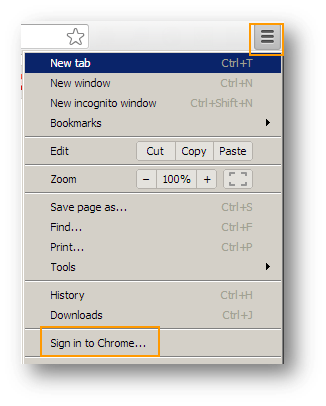
Step1: Sign in on the first browser. Click the options button in the top right corner, then select "Sign in to Chrome...".
Step2: Input your Gmail account and passport. You can stay on the first computer for some time if this is the first time for you to sign in, so that the browser bookmarks and browsing history will be totally uploaded to the cloud.
Step3: Sign in (Repeat Step1 & 2) on the second computer. You will find all bookmarks displayed under the address bar.

Chrome on the first computer (Win7):


Chrome on the second computer (Mac):


If you don't want to keep signing to Chrome, click options button and select "Signed in as your email address", then "Disconnect your Google Account...".
You can also sign in to Chrome browser on your Android phone, iPhone, Nexus 7, iPad or other mobile devices to sync the browsing bookmark and the like.


Method 2: Export and import Chrome bookmarks
Step1: On the first computer, click options button in the top right corner of Chrome. Select "Bookmarks" -> "Bookmark manager".
Step2: Click "Organize" and select "Export bookmarks from HTML file...". Then your Chrome bookmark data will be stored in an HTML file.

Step3: Copy the HTML file to a removable drive (your smartphone or flash drive). Connect the removable drive to the second computer.

Step4: On the second computer, go to bookmark manager and select "Import bookmarks from HTML file...". Locate the HTML file from the removable drive and import.


Monday, June 10, 2013

How IOS 7 Learns Design from Other Apps and OS

Apple introduces iOS 7 in WWDC 2013. Many people think this is the most important and bold update for iOS in last 5 years, and many new designs and features are "deja-vu" in our eyes.

So I collects some iOS 7 elements which can find an aspiration source.

 Many built-in apps

Weather

Photos

Calendar

Safari

Navigation Bar

And More...

  • Wallpaper --- Phase Beam (Android)
  • Swipe to backward --- Swipenav (Jailbreak Plugin)
  • Folders --- FolderEnhancer (Jailbreak Plugin)
  • Lock screen notifications --- Bulletin
  • Password to unlock --- Meizu Flyme (Chinese cellphone's customized Android)


Friday, June 7, 2013

Kindle Paperwhite and Kindle Fire HD officially enter China

After 5 years and 6 months waiting, Amazon Kindle finally show up in Chinese market.

US time Jun, 7th, Kindle Paperwhite and Kindle Fire HD occupied amazon.com's home page. While Kindle 5 and Kindle Fire HD 8.9 are missing this event.


From the table below we can have a simple price comparison between amazon.cn and amazon.com

Model Chinese Price US Price
Kindle Paperwhite ¥849($138) $119
Kindle Fire HD 16GB ¥1499 ($244) $199
Kindle Fire HD 32GB ¥1799 ($293) $269

No surprise that the Kindle family are more expensive in China than in US, especially taking the tariff into consideration.

But to be honest, the price gap is definitely acceptable. The latest version of iPad sells for ¥3688 in China, which equals $601, while in US, we can get it for only $499.

Another fact we should pay attention is that the eBooks in amazon.cn are pretty cheap. When I browse the Kindle store, books displayed on Top List are extremly cheap.

The right side image is the screenshot of top 7 books in Kindle Book Store. The most expensive book only sells for ¥2.80, which equals $0.45, and the cheapest one even less than $0.1. 


From the price we can figure out Amazon is really taking the Chinese market seriously, it is not a secret that the piracy is pretty rampant in China. The low price is a good way to introduce the legitimate digital content to more Chinese customers.

At the moment, there are nearly 40,000 eBooks available in amazon.cn, about 4,000 fo them are free public domains; over 30,000 books are selling under ¥7.99 ($1.30) and 7,000 books are under ¥1.99 ($0.32).

In China, the eBooks market is blooming, now they have Taobao, JingDong, DangDang, Douban, Duokan, TangCha, Zijieshe, etc competing with Amazon.

No doubt with Amazon shipping Kinle Paperwhite and Kindle Fire HD into China, the battle is becoming bloody.

On another hand, Amazon's rich experience in eBook marketing can accelerate Chinese eBook market going mature, that will be a good news for Chinese eBook lover.

For your information, all the Chinese eBook publisher are using their own method to encrypt their eBooks, which means, people are limited in a specific app or device to read a book purchased in a specific eBook store. For US, many publishers are using Adobe DRM, so they can easily use a Sony or Kobo device to read books from varies of stores.

Thursday, June 6, 2013

Will you prefer the $149 ASUS Memo Pad HD to the $199 Google Nexus 7?

Google Nexus 7 is an excellent tablet coming with terrific tech specs at a reasonable price ($199). It is actually recommended by many geeks to guys who want to have a good tablet but can't afford a more expensive device, such as iPad or iPad mini. Despite of the Tegra quad-core processor, 1280*800 pixel screen and a series of useful sensors, Nexus 7 can be a bit cheaper. Or for people who are after budget tablets, it is still a bit expensive. Fortunately, the ASUS Memo Pad HD is coming, at a cheaper price of $149.


Speaking of cheaper tablets, you may immediately think of Kindle Fire (not HD) and a few other unpopular models. However, you will spend money on none of these items as long as you know something about them: Kindle Fire is based on a terribly customized Android OS and other models are too lousy to use. This is not the case when it comes to ASUS Memo Pad HD. Do you remember the manufacturer of Nexus 7? Yes, Nexus 7 is manufactured by ASUS, so does Memo Pad HD!

So we don't need to worry about the quality about this cheap gadget. Now let's talk about hardware. To cut costs, Google removes rear camera and SD card slot from the device. As an owner of Nexus 7, I feel very unpleasant when I have to turn to my small-size phone every time I want to take pictures and share on social communities. It is great that the ASUS Memo Pad HD adds a rear camera and SD card slot. So it is complete! What's more, it sells at $149 only. It is said that there will be a $129 version (8G) for people in developing countries.


As to OS, ASUS adds something new to the pure Android 4.2, such as App locker to help protect some important apps. Apparently, this will bring more convenience and better user experience to customers instead of simple iterations of other cheap Android devices.

Probably, Memo Pad HD will become a big threat to the current Google Nexus 7. Hopefully the second Nexus 7 is coming soon.

Here is a video review of ASUS Memo Pad HD.


Monday, June 3, 2013

Will Kobo become the No.1 rival of Amazon Kindle?

Amazon Kindle and Barnes & Noble Nook used to be the biggest leaders in the eBook & eReader market. When Amazon is expanding its eBook business in foreign countries, Barnes & Noble takes an over-conservative strategy with very little investment in non-US regions. Even so, B & N Nook line does not show satisfactory performance in the US market. It is even rumored that Nook line will be purchased by Microsoft. Anyway, Barnes & Noble is not a strong opponent of Amazon any more.


In the meantime, Canadian eReader manufacturer, Kobo, is rapidly growing and zealously expanding into new markets. According to the Q1 financial report, the Kobo's overall revenue has received a continuous increase by roughly 98 percent, in both hardware and digital content. The newly released high-end eReader, Kobo Aura HD, has largely contributed to the growth of Kobo devices, which took up to around one third of the total hardware sales in Q1. What's more, downloads of Kobo for Android app has experienced an unprecedented growth up 378 percent.

At first, readers in countries like Canada and Australia, might be forced to choose Kobo eReaders or eBooks as they couldn't access Amazon Kindle in their countries at that time. When it is possible to choose from the two brands, some people will still select Kobo. A case in point is that Kobo Aura HD shows a higher resolution and better reading experience (such as a special page-turning design on the backside) than the popular Kindle PW (Kobo Aura vs. Kindle Paperwhite). On the other hand, eBooks in non-US Amazon eBook stores are not as rich as that in Amazon.com.  

It's no doubt that Amazon will fully enter the Chinese market soon with its Kindle devices after the official release of Amazon eBook store and Chinese Kindle for PC yesterday (2, June). In all eventualities, Kobo will break into new markets including China and India in the next few months. Then Kobo will become the only brand that is capable to compete with Amazon Kindle.