Wednesday, August 29, 2018

Kobo Update 4.10 Adds Overdrive Integration to Aura H2O2 and Aura Clara HD

Kobo has actually released new firmware update for Aura H2O2 and Aura Clara HD. But only adds library support for users in specific countries: Canada, UK, US, Australia, and New Zealand. So other Kobo owners will have to continue to use Adobe Digital Editions to transfer library ebooks using a computer and a USB cable.

When Kobo launched the Aura One two years ago, they thrilled fans by integrating support for library ebooks, only to frustrate us by leaving the feature out of subsequent Kobo models like the Aura H2O2 and the Clara HD.

However, Kobo’s new firmware Update 4.10 for its current ereader models that give owners the ability to access their local public libraries directly to their devices. Once they add their library account to their ereader, they can search for titles, place holds, and download library ebooks from inside the Overdrive section of the Kobo store on the device.

For those people who can't update to the latest firmware automatically, you can go to github to download it manually. 


Tuesday, August 21, 2018

Best 3 Tools to Help You Pirate Books

Although we have purchased ebooks or audiobooks, they are not truly owned by us because of the DRM protection. So we must get rid of the DRM protection to gain the full control of the purchased content. Below are the 3 powerful tools to help you back up your purchased content.
1. How to Pirate eBooks?
Epubor Ultimate makes it simple to decrypt ebooks purchased from mainstream books stores, like Amazon/Kobo/Nook/Google Play Books, etc. You can follow the guide to get rid of DRM.
Step 1, download Epubor Ultimate to your computer.
Step 2, download ebooks to your computer.
First you need to download Kindle books via Kindle for PC/Mac, or Nook books from Nook for PC or Nook Study, or Kobo books from Kobo for PC/Mac, or Google Play books via Adobe Digital Editions.
Step 3, run Epubor Ultimate to remove DRM.

Epubor Ultimate can automatically detect all of your downloaded books via Kindle for PC/Mac, Kobe for PC/Mac, Nook Study, Nook for PC and Adobe Adobe Editions.
So when you launch Epubor Ultimate, you will notice that all the downloaded books are displayed under respective Tabs in the left side-bar. All you need to do is to add the books to the right main window to remove DRM.


2. How to Pirate Audible Books?
With the help of EpuborAudible Converter, you can easily decrypt Audible books with the fastest speed. Follow the below steps to get rid of Audible DRM.
Step 1, download Epubor Audible Converter to your computer.
Step 2, add Audible books to Epubor Audible Converter to remove DRM.
You can upload your downloaded Audible books quickly by simply clicking the Add button. It will pop up a window contains all of your downloaded Audible books. And Audible books will be decrypted immediately as soon as they are added to Epubor Audible Converter.


3. How to Pirate eTextbooks?
You’ll get DRM free Epub or PDF files (depends on the book type delievered by VitalSource) after downloading your VitalSource eTextbooks with Epubor VitalSourceDownloader.
Step 1, download Epubor VitalSource Downloader to your computer.
Step 2, click the book cover to start downloading the book to your computer.


With the 3 DRM Removal tools, you can gain the full control of the paid books, Audible books and VitalSource eTextbooks. 

Monday, August 13, 2018

Walmart teams up with Kobo to sell ebooks and audiobooks


On January 25, 2018, Walmart announced a strategic alliance with Rakuten, the number one e-commerce company in Japan.
Kobo is a global leader in eBooks and audiobooks with nearly six million titles from thousands of publishers – everything from children’s books to New York Times best sellers and indie titles.
The eBook and audiobook offering will be fully integrated into the Walmart online shopping experience, and customers will be able to buy these versions as well as the physical book while shopping for their favorite titles. 
All eBook content will be accessible through a Walmart/Kobo co-branded app on all iOS and Android devices, a desktop app and Kobo eReaders (which will offer online and in stores later this year). And the official launch of the digital bookstore on the Walmart website will be launched on August 21st.
Partnering with Rakuten for access to Kobo is one of the quickest and easiest ways for Walmart to enter the e-book market. While Rakuten has the chance to grow Kobo's relatively small US footprint, Walmart has a better chance of challenging Amazon with this partnership.


Monday, August 6, 2018

Best DRM Removal Tool for eBooks

The majority of eBooks purchased from popular eBook store comes with DRM protection. So have you even been troubled by the DRM limitation after you purchase the eBooks? For example, you can't share your books with your friends freely or back up your purchased books? If you do, this article is going to show you how to remove DRM from popular mainstream eBook stores using the best DRM removal tool for eBooks.


1. How to Remove DRM from Kindle Books

Step 1, download Epubor Ultimate to your computer.

Step 2, download Kindle books to your computer via Kindle for PC/Mac.

Step 3, run Epubor Ultimate, all of the downloaded kindle books are displayed in the left side-bar under Kindle tab. Then all you need to do is add the Kindle books to the right main to remove DRM.

Tips: After downloading Kindle books to your computer, Epubor Ultimate can automatically detect your downloaded Kindle books in the left side-bar. Epubor Ultimate can also detect your Kindle books downloaded via Kindle e-ink reader after connecting the device to your computer.

2. How to Remove DRM from Google Play Books

Step 1, download Epubor Ultimate to your computer.

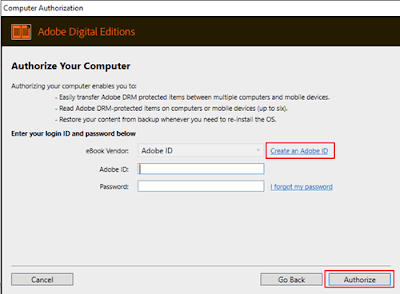
Step 2, download Adobe Digital Edition to your computer and authorize it with an Adobe ID.

Step 3, go to Google Play store, click Books > My books on top-left of webpage. Then find ebook title you want to download, click the three dots icon on the top-right corner of ebook title. Next select Download EPUB or Download PDF from popup menu to start downloading the book.
Step 4, you will get a .acsm file instead of a Epub or PDF file directly. So you need to double click the .acsm file, then ADE will download the book automatically. After downloading the book to your computer, you can open and read it in Adobe Digital Editions.
Tips: you will only get an .acsm downloading link when you download EPUB/PDF from Google Play Books website. Then you must double click the .acsm link to download the content via ADE.
Step 5, all of your Google Play books downloaded via ADE will be displayed under Adobe tap in the left side-bar. Next add the books to the right main window to remove DRM.
3. How to Remove DRM from Kobo Books
Step 1, download Epubor Ultimate to your computer.
Step 2, download Kobo for PC/Mac to your computer and log in with your own account. Then download your Kobo books to your computer.
Tips: Kobo for PC/Mac must be downloaded from Kobo official website, or Epubor Ultimate can't detect the downloaded Kobo books automatically.
Step 3, run Epubor Ultimate, you will see that the downloaded Kobo books are displayed under Kobo tap in the left-side bar. Next add the Kobo books to the right main window to remove DRM.

Tips: Epubor Ultimate can automatically detect your Kobo books downloaded via Kobo for PC/Mac.
4. How to Remove DRM from Nook Books
Step 1, Download Nook books via Nook App.
Install Nook App from Microsoft store to your computer and sign in to your Nook account. Then you will be able to download Nook books.

Step 2, Install Epubor Ultimate to your computer
Tips: Since Nook App is only available for Windows 8/10, you can only use Epubor Ultimate for Windows to remove Nook DRM.
Step 3, Remove Nook DRM
When you launch Epubor Ultimate software, you will see that all of your nook books that are downloaded via Nook App appear under Nook tab on the left panel. To remove Nook DRM, you just need to add your Nook books to the right main window.

Tips: you can find the drm free Nook books by clicking Decrypted or the book folder icon on the lower left corner of the software.
The best DRM removal tools for eBooks can not only decrypt Kindle/Kobo/Google Play/Nook books, etc, it can also convert the decrypted book to Epub/Mobi/AZW/PDF/TXT.

Download Epubor Ultimate for Free

Friday, August 3, 2018

Apple Becomes First Publicly Traded Company To Hit $1 Trillion

Apple on Thursday became the first publicly traded U.S. company to be valued at $1 trillion, achieving the milestone when its stock hit $207.05 a share.

The milestone comes a day after Apple reported blockbuster quarterly earnings. The tech giant had relatively flat iPhone sales but increased its revenue thanks largely to higher-priced models including the iPhone X, with a list price of just under $1,000. The company also boosted its revenue from services, including Apple Music and the app store.
Although many have doubted Apple's staying power over the years, unlike many hardware makers the company has ridden the elegance and functionality of its devices. Under CEO Tim Cook, Apple also has embraced the internet, with its thriving services business helping propel the company toward the new milestone.


Monday, July 30, 2018

Your 2018 iPhone may be slower than Android phones

That's because Apple's upcoming iPhones will use only Intel modems, Qualcomm inferred, and that could mean slower network speeds.
Apple has been using Intel 4G chips for some models of the iPhone and Qualcomm chips for others. Apple appears to be making some big changes to the chips in its upcoming iPhones -- and that could mean your next iPhone downloads data slower than rival Android devices.
Qualcomm, a major supplier of 4G chips for smartphones, on Wednesday said it doesn't expect to supply modems for any upcoming iPhones.
"We believe Apple intends to solely use our competitor's modems rather than our modems in its next iPhone release," Qualcomm financial chief George Davis said during an earnings call with analysts.
Cristiano Amon, the head of Qualcomm's chip business, noted that it doesn't mean Qualcomm has lost Apple's business forever, but it's out for now.
"This is a very dynamic industry," he said during the earnings call. "If the opportunity presents itself, I think we will be a supplier of Apple."
Apple and Qualcomm have been fighting over patents since the beginning of 2017. Qualcomm previously supplied all modems for iPhones, but Apple now uses 4G chips from Intel in about half of its phones -- particularly those running on AT&T and T-Mobile networks. The move gave Apple more leverage in its battle with Qualcomm, but it has been criticized for hurting consumers by limiting their network speeds.
Qualcomm didn't say which company will supply modems for the next iPhone, but it's believed to be Intel.
Apple's apparent move to source its chips from one supplier could have big implications for your next iPhone. Going back to one chip provider could make it tougher for Apple to keep up with demand for its upcoming iPhones, which means you may have to wait even longer to get your hands on a new device. And speed tests have shown Qualcomm-powered smartphones are capable of faster network speeds than the devices running on Intel processors.


Wednesday, July 25, 2018

How can You Get a Free PDF of Any Book?

Love to read? Then you'll love these places to find free books. Most importantly, you can get access to millions of books you need, for free. However, some people only want to download the PDF format to read the book. Good news is that even some books are not available in PDF format, here’s a powerful ebook converter software—EpuborUltimate to help you convert to PDF.

1. Read Print--Read Print is a free online library where you can find thousands of free books online to read, from classics to science fiction to Shakespeare.
2. ManyBooks--ManyBooks is one of the best resources for free books in a variety of download formats that you can possibly find on the Web. 
3. The Literature Network--The Literature Network is organized alphabetically by author. Click on any author's name, and you'll see a biography, related links and articles, quizzes, and forums. 
4. Librivox--Librivox.org is a dream come true for audiobook lovers. All the books here are absolutely free, which is good news for those of us who have had to pony up ridiculously high fees for substandard audiobooks. 
5. Authorama--Authorama.com features a nice selection of books written in HTML and XHTML, which basically means that they are in easily readable format. 
6. Scribd--Scribd offers a fascination collection of all kinds of reading materials: presentations, textbooks, popular reading, and much more, all organized by topic. 
7. International Digital Children'sLibrary--Browse through a wide selection of high quality children's literature here. 
8. PlanetPDF--A small collection of classic novels all in PDF format.
9. DailyLit--Read books online by daily email and RSS feed.
10. Wikibooks--Wikibooks is a Wikimedia community for creating a free library of educational textbooks that anyone can edit.
11. Dwalin--Free novels in text format.
12.  Project Gutenberg--Free ebooks from producers.
13. Adobe Free eBooks--n Adobe’s Free eBooks area, you can download, unlock, and read electronic books on your personal computer or reading device.
14. Alive & Free--A page of links to some recent books from living authors available free online.
15. Franklin--Thousands of free titles in text and HTML file formats.
16.  PDFbooks--This new site offers around 4,700 downloadable public domain e-books.
17.  FreeeBook Miners--Free eBooks for your education, research or amusement.
18.  Planet eBook--Free classic literature to download and share.
19. e-Library--Plenty of free ebooks available for download.
20. BookBoon--Provides free ebooks for students and travelers in PDF format. No registration is required.

If the book downloaded from the above sites are not in PDF format, you can use Epubor Ultimate to convert the book to PDF. 

Epubor Ultimate can not only decrypt DRMed ebooks purchased from mainstream ebook stores like Amazon/Google Play Book/Kobo/Nook, etc, it can also convert DRM free books to PDF/Epub/Mobi/AZW3/TXT...